
Git Flow
Introduction
1. GitFlow Description
gitflow: A branch management strategy for versioning (essentially a wrapper around git)
- Common branches include master, develop, feature, release, hotfix (support branch is rarely used)
- master and develop are remote branches; feature, release, and hotfix are local branches.
- Remote branches are those that need to be pushed to remote repositories such as GitLab or GitHub
- Local branches refer to the git version control environment used by developers for local development
2. GitFlow Flowchart and Description
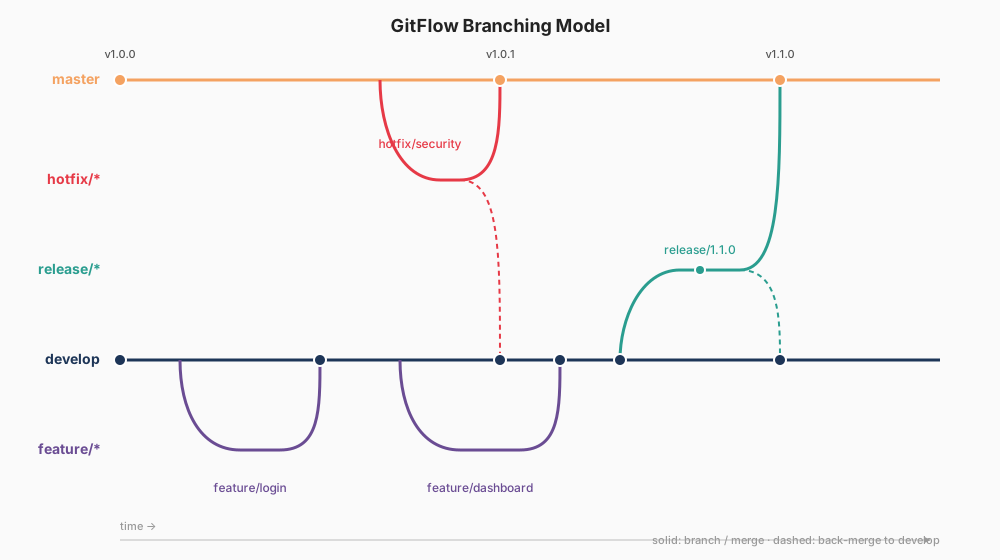
master: Main branch
- The most stable branch with complete functionality, ready to be released to production at any time (read-only branch, can only be merged from hotfix/release, cannot be directly modified)
- Pushes to the master branch should be tagged for traceability;
develop: Development branch
- The branch with the latest and most complete features, cloned from master (only the first time);
- Feature branches are merged into develop after passing local testing, then deleted;
- After collecting all features to go live (containing all code to be released in the next release), a release branch is created from develop for testing;
- After release/hotfix branches go live, they are merged into develop and pushed;
feature: Feature development branch
- For developing specific new features, cloned from the develop branch. After feature development is complete and local testing passes (compilation succeeds without errors), it is merged into the develop branch;
- Multiple feature branches can exist simultaneously, i.e., multiple team members can create temporary branches for concurrent development. Branches can optionally be deleted after completion;
release: Testing branch
- Used for submitting to testers for functional testing, cloned from the develop branch after feature branches have been merged into develop;
- Bugs found during testing are fixed on this branch by creating bugfix-* branches. After all bugs are fixed and the release goes live, it is merged into both develop/master and pushed (completing the feature). A tag is created when pushing to master;
- Temporary branch, can optionally be deleted after going live (once release testing begins, new features from develop are not allowed to be merged into the release branch; new features must wait for the next release cycle);
hotfix: Patch branch
- Cloned from the master branch, primarily used for fixing bugs in the production version;
- After fixing bugs, merged into develop/master and pushed (all hotfix changes will be included in the next release). A tag is created when pushing to master;
- Temporary branch, can optionally be deleted after the bug is fixed
3. Development Guidelines and Conventions
- Guidelines
- Apart from source code, any build artifacts (e.g., Maven's target folder, .idea folder, etc.) must not be committed to the source repository and should be added to the .gitignore file
- Developers must strictly follow the agreed-upon gitflow branch management process, switching to the designated branch for developing the corresponding features
- After completing a task, thorough self-testing based on test cases must be performed before pushing to develop. It is strictly prohibited to push code that fails compilation or is incomplete to remote branches
- Conventions:
- Main branch name: master; Main development branch: develop
- Tag name: v*.release, where "*" is the version number, "release" is lowercase, e.g., v1.0.0.release
- Feature development branch name: feature-, where "" is the corresponding task number from Jira (Aone)
- Release branch name: release-, where "" is the version number, "release" is lowercase, e.g., release-1.0.0. Bug fix branches on the release branch are named bugfix-*
- Bug fix branch for master: hotfix-, where "" is the corresponding task number from Jira (Aone)
Testing Section
A full cycle exercising the workflow: initialize a repo, push the long-running branches, develop a feature, and merge it back into develop.
bash
# 1. Initialize gitflow locally and push the long-running branches
git init
git flow init -d                              # -d: accept default branch names (master/develop)
git remote add origin [email protected]:owner/repo.git
git push -u origin master
git push -u origin develop
bash
# 2. Simulate a separate developer cloning the repo
mkdir -p ~/tmp/work && cd ~/tmp/work
git clone [email protected]:owner/repo.git
cd repo
git flow init -d                              # required once per local clone
bash
# 3. Start a feature, commit work, and publish the branch
git flow feature start TICKET-123             # creates & checks out feature/TICKET-123
# ... edit files ...
git add .
git commit -m "feat: add login form"
git flow feature publish TICKET-123           # pushes feature/TICKET-123 to origin
git push                                      # subsequent commits track upstream
bash
# 4. Finish the feature: merge into develop and clean up
git flow feature finish TICKET-123            # merges into develop, deletes local branch
git push origin --delete feature/TICKET-123   # also remove the remote branch
git push origin develop                       # push the merge commit
After feature finish, the new feature is merged into develop. The release and hotfix cycles follow the same shape via git flow release start/finish and git flow hotfix start/finish.
Reference: